Wednesday, February 24, 2010

Long Range XBee PRO XSC testing, Part 2

It has been awhile since my original post about seeing how large of a distance I can get two XBee PROs to communicate, but since coming across two nice 902 - 928Mhz ISM band 9 element yagi antennas I figured it was time to give it a try.


My plan is to mount two XBee PRO XSCs each to one of the yagis mounted on tripods. A small ttl to serial interface will be needed at each end which will allow interfacing to laptops. These setups will need to be as portable as possible. With each setup I will be able to set them up easily at any location (the tripod / antenna / XBee and interface, along with a laptop will be the only items needed) and test signal strength and communication using the XBee X-CTU application.

I finished the first ttl to serial converter tonight, only one more to make:


The final step will be to find two locations that are line of sight and up to 15 miles apart using topographical data. 15 miles is a long way, so I will be starting with a five mile distance. As soon as it warms up I will be giving the range test a try. I'm hoping to reach the 15 mile range Digi states that these modules are capable of, but even further would be better. :D

Thursday, February 11, 2010

Serial VFD character displays are awesome

I finally spent a few minutes powering up the serial VFDs I bought a month or so ago, they are all working. :)


And it's bright! :D Placing a filter over the front will increase contrast and make it much easier to read in bright conditions.

I will say that these are by far the easiest displays I have ever worked with. Powered it up with 5V, wired it through a max232 to my machine, 19200, 8,1,1 was its default serial config and it was running. Any text to the terminal showed up on the display. Special codes can place cursor and clear the display. With a little extra work you can write custom characters to the displays memory. Interfacing these with any microcontroller will be so easy and will save a bunch of io pins and code space not having to interface HD44780 compatible displays via a parallel interface.

Thursday, February 4, 2010

Using a hard drive spindle motor for projects

I was recently staring at a pile of 15K RPM SCSI drives that had gone bad at work. I have always admired the build quality of these drives, the fact that they can spin at 15000 rpm without failure for years is amazing. I was curious if the platter spindle motors would be useful to use in any type of projects, so I tore a couple drives apart and pulled the spindle motors out of them.

These spindle motors are basically a small three phase motor. My initial assumption to drive them was that you would need to provide each phase a voltage pulse in sequence to create rotation. Looking at a drive with my scope I could see that this was definitely not the case. The waveform on each pin was extremely complex, actually so complex that all of my Agilent and Tektronix digital scopes had a hard time capturing the waveform. My best success in capturing was with my Tektronix analog scope. The waveform to one of the phases can be seen here:


This shows again how as awesome as digital scopes are, sometimes an analog scope can provide a better picture of the waveform you are trying to see. :)

To drive this motor, I wanted to see if I could get it spinning as fast as possible with the minimum amount of circuitry simply by pulsing the three phases in sequence. I chose a pic 18F4520 as the controller and was driving each phase using a TIP31C power transistor. Initially I was using a ULN2003 to drive the phases, but found the current consumption from the motor was higher than I would have liked risking damage to the ULN2003. This motor is definitely harder to drive than a typical stepper motor.


When initially starting up the motor, you need to start the pulses at a slow rate. I found that pulsing each phase at about 20Hz (1200 rpm) was slow enough to get the spindle rotating.


Once initial rotation is established you can begin decreasing the delay between pulses to increase the spindle rotation speed. Driving the motor with a square wave, I am able to reach speeds just over 100Hz (6000 rpm) before the motor begins decreasing speed.

At this point my pulses begin to overrun each other causing speed to decrease as each phase is on consecutively. Decreasing the pulse width doesn't help either as the decreased pulse width doesn't provide enough current to each winding to keep the motor running. I would like to try driving it with sine waves, or that complex waveform that the original controller generates, but 6k rpm is pretty good for the minimal circuitry required. Not bad for about an hour worth of work anyway.


I found that placing the platters back on the spindle acted as a flywheel which helped the motor maintain smoothness being driven by the pulses. To control the speed, I used an adjustable resistor to provide input into one of the adc inputs on the pic. This in turn adjusted the pulse width of the motor. Here is the code to make it spin:


#pragma config WDT = OFF

void delay1(int result1)
{
result1 = result1 / 20;
if (result1 <= 30)
{
result1 = 30;
}
Delay1KTCYx(result1);
}
void delay2(int result1)
{
result1 = result1 / 12;
Delay1KTCYx(result1);
}

void main (void)
{
int result1;
TRISB = 0x00;
while (1)
{
OpenADC( ADC_FOSC_4 & ADC_RIGHT_JUST & ADC_4_TAD, ADC_CH0 & ADC_INT_OFF, 15 );
ConvertADC();
while( BusyADC() );
result1 = ReadADC();
CloseADC();


PORTB = 0b00000001;
delay1(result1); //big
PORTB = 0b00000000;
delay2(result1); //short
PORTB = 0b00000010;
delay1(result1); //big
PORTB = 0b00000000;
delay2(result1); //short
PORTB = 0b00000100;
delay1(result1); //big
PORTB = 0b00000000;
delay2(result1); //short
}
}


Next I plan creating a simulated sine wave with the pic to try to obtain higher speeds and smoothness replicating what the hard drive controller circuity does. I would like to look into the pulses generate by the actual hard drive controller as well to get a better understanding of how it can reach speeds of 15000 rpm.

Thursday, January 7, 2010

Updates and new serial VFD modules

I'm finally moved in the new place, unfortunately there has been a lot of 'home things' that needed attention that have pushed back my electronic and software projects. I have been setting up my benches and unpacking my equipment this week in the new basement work area which I am very excited about. I should actually be able to start getting back into things this coming week.

Today my new serial VFDs showed up which has me pretty excited:


They are two line by 20 character display with both an 8 bit 5v parallel and up to 19200bps serial interface. Vacuum fluorescent displays just have a nice glow to them that contrasts the typical look of an LCD display you see today. I plan on using one as a primary display interface for my CPU project among other things.

Wednesday, November 18, 2009

Moving day, projects on hold

The downturn in the economy has created some amazing deals in the housing market around me. Because of this I have purchased a new home and will be moving next week. This will of course put my projects on hold, I definitely have a lot of packing to do...

The really good news is that my new home has a huge basement which will allow me to have much more room for my current cluttered work area. :D


Thursday, October 22, 2009

Recovering a HP 16500B Logic Analysis System From a Failed Hard Drive to a CompactFlash Drive.

In a recent auction I purchased two HP16500B logic analysis systems and one HP16500A system for pretty much next to nothing which had me very excited. I have been looking to upgrade from my current 1630D logic analyzer to something a little more powerful. My 1630D has been excellent and has worked perfect for many tasks, but I have been finding that I have needed a more powerful analyzer with a lot more memory depth for some recent hardware hacking projects i have worked on. I have wanted to buy a 16500B system as their prices are reasonable, but the hard drives that they use have scared me. These hard drive based systems are ticking time bombs. Once it's disk fails the device is useless unless you have the original system boot disks for it and a working floppy drive.


The price of these three systems I bought was next to nothing, and having local pickup as an option saved me a ton in shipping as these devices are by no means small or light. So even if they were all dead I wouldn't be that upset. Upon arrival home and powering them all up, one of the three worked. The 16500A has a power supply issue and will be looked at soon. I was really interested in the two 16500B systems which one worked perfectly while the other had the common 'HARD DISK FAILURE' error upon boot indicating a dead hard drive. Luckily both of these systems came with a full (unopened) floppy disk set of the system software which lets me boot the system with the failed drive from the floppy. While I was able to successfully boot the system, unfortunately many of the modules in it have been upgraded which my disk set didn't support leaving these feature modules useless.

These systems use a Quantum PI16A011 hard drive of 170MB capacity (at least both of mine did, later earlier or later models may have had different disks). Now while I probably had a box of these drives 10 years ago or so, I have since thrown them all away. I figured purchasing one would be easy but the only similar ones I found on eBay the sellers wanted a premium for them because they were 'vintage'. Whatever, I'm not paying you $40 for a 15 year old hard drive that will probably just fail again. Looking for a more permanent solution I decided to give a Compact Flash card a try in the device.

CF cards have the cool ability to mimic a hard drive in CHS mode ( cylinder / head / sector) . I have saved many failed firewalls and other embedded devices by replacing their failed hard drives with a CF card using a CF to IDE adapter card. You can find these adapter cards for around $5 to $10.

To get the data onto the new system I considered pulling the good drive out of the working 16500B and throwing it in a linux machine along with the CF card IDE adapter. I could then clone the disk using the 'dd' command to the CF card making an exact copy. Since I had already backed up all the data from the working 16500B to my network in fear the the working one would die, it was easier for me to just ftp this backup data over to the failed system.

Here is how I was able to recover my 16500B system with the failed drive by replacing it with a CompactFlash card:

1. I booted the good working system and configured the network interface for an IP on my network. This allowed me to ftp to the 16500B, logging in with the user 'control' and no password. I then copied over all files on the 16500B system via ftp get to my local computer. I now had a backup of all of the system software for safe keeping. (Note: If using an ftp application such as LeechFTP, or any other that allows threaded ftp functionality, make sure only one thread runs at a time. Trying to transfer more than one file at once will cause the 16500B to lock up) Note, Note! If you have a 16500B, back up it's software to your network! When that drive fails you will need this data to recover.

2. I purchased a CompactFlash to IDE adapter to use in the 16500B with the failed disk. I had to try several of them before I found one that worked with the 16500B. (Buy a quality one, not a cheap Chinese one. Make sure it also has a jumper for master/slave configuration and set it to Master).

3. Buy a CompactFlash card and place it in the adaptor. I used a 64MB card in my 16500B successfully. These cards follow the basic CHS (cylinder / head / sector ) format of older hard drives so it works fine. Avoid cards larger than 256MB as the 16500B may not recognize them ( I haven't tested, just my assumption. I do know for sure that my 64MB card works perfect).
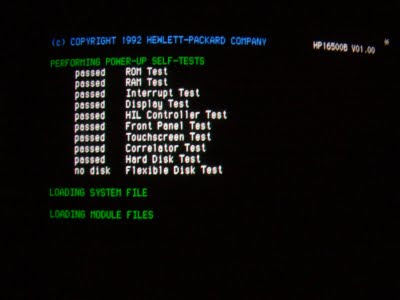


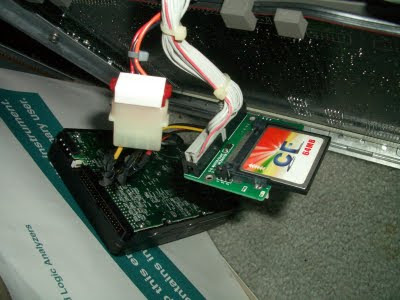
4. Place the adapter in the 16500B with the CF card installed. You will need to come up with your own mounting system to hold the new CF adapter in place where the hard drive was located. Connect the IDE cable and power connector to the adapter. Make sure it doesn't short out to the chassis ground.


5. Power on the 16500B and boot it via the system floppy disk. During boot, it will still report the 'HARD DRIVE FAIL' error message, this is normal.

6. In the 'system' menu, select 'hard disk' then select 'format' and press 'execute'. It will prompt you twice to confirm and format within a few seconds. If you have any errors here try a different CF card or adapter. Again, I had to try a few different ones to find one that worked.

7. Configure your 16500B's network adapter for a free ip on your network. Place an AUI media adapter on the 16500B and hook up to your network. It now should be pingable from another computer.
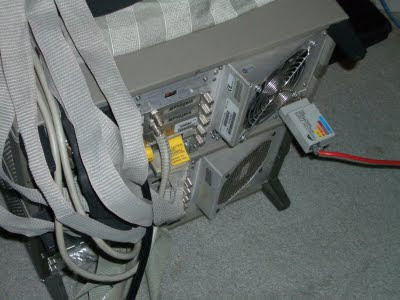


8. FTP to the 16500B's ip and login with user 'control', no password. You should login successfully. Now copy over all of the HP16550B's /system files from your backup to the 16500B with the CF card. If your CF adapter has an LED activity light, it will be blinking showing the data is indeed being copied. This may take up to 15 minutes to complete. If you only have the backup floppy disks, copy them to the CF card via the 16500Bs interface. I find it much faster to copy the floppies to a computer and ftp over all the data. The /system directory is the important one you will want to copy over.

9. Once all files are copied, remove the 16500B's floppy disk and power cycle. Upon boot, the hard disk should pass the self test and it should be immediately booting. Your 16500B is now ready for use!


Now CF cards do have a limited lifespan as well in regards to the amount of writes they can do, but since my 16500B just reads the card to boot, it should last a very long time. I'll still have to compare the CF card to the hard drive to see if there is any speed benefit in boot time to using the CF card. These are very powerful and excellent logic analyzers that are well worth converting to CF cards to increase their lifetime. Remember, if you have a working 16500B system, back up it's software before it's too late!


Thursday, October 1, 2009

CPU From Scratch

I haven't been posting too much lately, mostly because I have taken on a very ambitious project. I have decided to create an entire CPU from scratch using only TTL based logic. This project has been in the works for about two months now and I finally have something to show for it. Because this project is going to be more in-depth than most I have dedicated an entire wiki to it which can be located at bradthx.net.


As it stands now I have an 8-bit CPU that is able to load and store instructions into address and instruction registers from memory. This proves (along with a lot of additional debugging) that my design seems solid and I can begin designing my opcode and burning it to eproms. I will update this blog when I make major milestones, but all the technical data will be located at bradthx.net.