Showing posts with label peoplebacon. Show all posts

Wednesday, March 30, 2011

Faster PCB Etching with Ferric Chloride

At times I am very impatient when I am working on a project and want to assemble a working design. If the design is simple enough I will assemble it on a copper perf board, but often the component count is high enough where a PCB is a much better solution. If the design has a really high component count with lots of surface mount components I will send the board out to a fab house only to have to wait a few days to a month for it to return before finally finishing my project. Sometimes this is much too long. What if I want to have a finished design that night? The solution is etching... more specifically fast etching.

I have been etching my own boards with ferric chloride for years with great success. The only downside to this is time. A larger board will take 20 to 30 minutes (sometimes even longer) to etch in the solution. It also requires agitation to keep it etching effectively by keeping the fresh solution contacting the copper. This requires you to either shake the container of ferric chloride or push the board around constantly in the solution as it etches.

My solution was to have something agitate the board for me.


This was my first test of using a VWR vortexer to speed up the process. This device was designed for a lab environment to hold test tubes, beakers, and such. The lower plate rotated around causing a mini vortex within the containers solution that would be placed on it. I have modified it to hold a glass container full of ferric chloride to agitate the solution for me. The glass container I am using is perfect for the job. It is a food container called 'Glass Lock' and has a tight fitting plastic lid that locks into place on all four sides. Nothing will be leaking out of it. I bought two of them for the lids. One has small holes that I drilled to allow fumes to evacuate while the second lid is unmodified to store the solution.

Ferric chloride also works better when it is warm. To facilitate this I mounted a good sized peltier junction to the bottom with an epoxy heatsink compound and supplied it with a 12V 2A power supply. It heats the solution up to about 110 degrees Fahrenheit, still below the maximum ferric chloride recommended temp of 135 degrees.

The VWR vortexer as it arrived has an adjustable speed control, the only issue was it had a minimum speed of 1200rpm. This is much too fast for what I needed. Opening up the unit I found two adjustable resistors that let you adjust the minimum and maximum speeds of the motor. I was able to adjust it all the way down to a nice ~200 rpm, perfect to keep the ferric chloride in motion.

In goes the PCB:


With the lid locked on and the vortexer switched on, I checked the board every five minutes.


Total etching time was about 12 minutes, less than half the time of any previous etching I have done. After a quick sanding here is the finished board before tin plating:


Not perfect, but not bad for less than an hour and a half time. I had the design drawn up in eagle in about 45 minutes, the rest was transferring the design to the copper and etching.

Future improvements will be to add a second peltier device to get the solution up to a higher temperature and to also add a digital temperature gauge to make sure the solution does not get too hot.

Sunday, October 31, 2010

Happy Halloween

We had an extra pumpkin and I had 20 minutes... :)


Happy Halloween.

Friday, September 17, 2010

My Electronics Bench and Test Equipment

I have been into the electronics field since I was about 11 years old. I reached that phase of my life where I began taking everything apart and wondering what all this 'stuff' inside these electronic devices was. It wasn't too long until I began understanding and learning while making my own analog and digital designs come to life. Eventually I reached a point where my current tools were just not allowing me to really debug and see what was going on inside the circuit I was designing. This is where I realized I needed better equipment than what I had.

Throughout this post I am going to talk about the equipment I own and what you should look for if just stating out in electronics. With all of the equipment available on the used market, anyone beginning in electronics that is taking it seriously should have the basics: A good multimeter, a soldering station, and a current limiting adjustable power supply. Without these three items frustration will only ensue.

We all start somewhere and my start was with a $9 RadioShack soldering iron and a couple dollars more analog multimeter. While the meter suited me fine for a very long time, the $9 fire hazard was the most frustrating piece. I remember at the time reading my Radio Electronics (later Electronics Now) magazine and looking in the back advertising sections at the nice Weller soldering stations and amazing test equipment that was being made by companies like HP and Tektronix. I had only wished that I could have even a 20Mhz oscilloscope but with my non-existing income as being in middle school allowed, I had to settle for some basic test equipment like the multimeter I had.

My break came in 7th grade when one day I happened to notice that my science teacher had an oscilloscope in the labs storage closet. I questioned my teacher about it only to learn that it didn't work and had been there a very long time. To my surprise my teacher said I could have it if I wanted it which I enthusiastically accepted. It was a very old Bell+Howell model, most likely a kit originally. It had only a couple Mhz bandwidth and upon opening it was full of tubes. The issue it had was there was no horizontal sync, only a single dot burning a mark into its crt upon power on. I immediately pulled all the tubes and went to a local tv shop which I had remembered still had an old tube tester in the back (this was like 1993, tubes were still very obsolete). I tested all of the tubes and found a few that were definitely bad and purchased replacements. Upon powering on with new tubes in place, I finally could see into the time-domain of the circuits I was building. The 555 timer oscillator circuit I could finally see the waveform being generated. From my 1Mhz crystal oscillator I could see a near perfect square wave with a 50% duty cycle. It was a very exciting time. This only fueled the fire for things to come.

I dealt with basic equipment all thorough college, but once I had a job and could finally afford good test equipment, I went at it full force. It is amazing to see how cheap test equipment has become, especially on the used market.

Here is the current test equipment that I own as this is my current bench as it exists today:


A nice big workspace is key, I personally like deep desks which allow me to place bigger items far away from me without taking up valuable local workspace. I built the bench shown above as I was not able to find any workspace that nicely fit my needs. They do exist, but can cost a considerable amount of money. I built my bench with a strong shelf to hold most of my test equipment right at eye level, it had to be considerably strong as some of the older test equipment can weigh 60 pounds or more each (HP / Agilent builds things very well ;) ). Also shown is an anti-static mat as it it important to not destroy your expensive components before you get to use them. Now to talk about the equipment itself:

Multimeter. The absolute most important piece of test equipment for anyone. In my opinion this is the first thing anyone interested in electronics needs to buy. I use Fluke multimeters as they are the best, hands-down. I have a Fluke 77 II shown here along with a Fluke 73 (not shown). Need to see exactly how much voltage that power supply is putting out? Need to see how much current this circuit is really drawing? Need to see how many ohms that resistor really is? A multimeter has the answers. A good multimeter will pay for itself the first time you don't blow up the circuit you are working on out. I also still have my original Micronta analog multimeter and use it every now and then. Analog multimeters have the benefit of being able to see slow voltage changes over time by watching the needle move. Hook one up to an 110V outlet in your home to see what I mean, it shows a slow voltage inconsistency that a digital meter cannot easily display.


Soldering Iron, a good one. This is the 2nd most important tool anyone interested in electronics needs. An adjustable temperature one is best, especially dealing with temperature sensitive smd components. You are able to turn the temp down when needed, but also have the ability to crank it up when soldering or desoldering components on huge ground planes. I like Weller, but there are many good brands out there. A digital display is nice for being able to see what the current temperature is set at. The Weller below also has an anti-static tip to make sure you don't destroy any devices from rogue static charges on the iron itself.

Oscilloscope, the standard piece of test equipment when you are serious in electronics. I have many of them. An analog scope with decent bandwidth is still an extremely important piece of test equipment as it allows you to look into the time domains of signals to see what is really going on. The Tektronix 2246 seen here is an awesome scope. This is the scope I go to most even with the several digital scopes I own. Analog scopes are simply better for viewing complex analog waveforms such as a video signal. Everyone needs at least one good analog oscilloscope. I have talked about the benefits and disadvantages of analog vs digital scopes in previous posts, but it will deserve much more discussion in it's own dedicated post. If you are looking for your first scope, go for a 40Mhz to 100Mhz analog model IMO. It will serve you well. Above the Tektronix in the pic is a Racal-Dana 1992 1.3Ghz frequency counter which I will discuss shortly.


Digital oscilloscopes are extremely awesome as well. The one shown on the bottom here is a HP 54503A digital oscilloscope. it is a 500Mhz 4-channel digitizing oscilloscope. This is the scope I go to most when dealing with high speed digital signals. The 500Mhz bandwidth allows me to see very high speed repetitive signals easily.


The scope below is one of my favorites, an HP 54112D. It is a digital scope similar to the 54503A above, but offers may comprehensive triggering options. It is often used for glitch detection, where you are looking for an anomaly in a signal. Because it has digital storage options, it is able to store any waveform once the specified trigger has been hit allowing me to see what happened. This was very useful during the design of my own custom ttl based cpu last year.

Make sure you do not skimp on the scope probes! A good set of probes can easily cost more that the scope itself when buying used. A quality passive probe from HP / Agilent or Tektronix that is matched to the scope it will be used on is a must, especially when dealing with high speed signals. Using a cheap generic probe will distort the signal being measured and not truly represent the signal you are viewing on it's display. A cheap probe can also actually inject noise into a circuit destroying the signal you are attempting to observe. Pay attention to the probe attenuation factor as well. A 10X (attenuated by ten times) probe is good for most cases, but be aware it will be difficult to look at signals under about 10 millivolts with one. Be sure to compensate any passive probe before use, otherwise your signals could appear distorted.


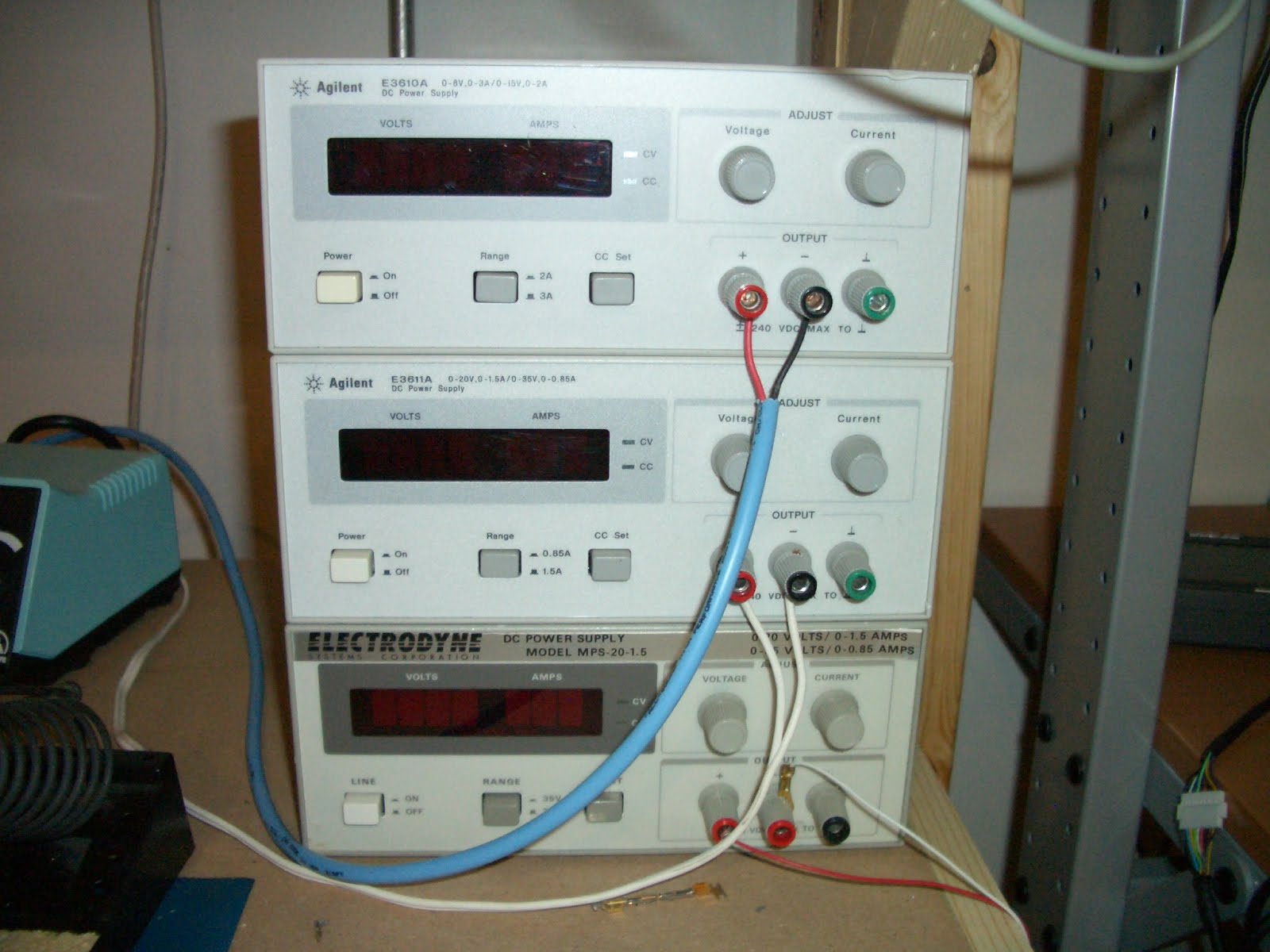
Power supplies. These are actually more important than a good oscilloscope for the beginner. An adjustable voltage, current limiting power supply will keep you from destroying your circuits in the event of a mistake. I have five of these and use them for everything. The ones below are all HP / Agilent models and are my favorite for the money. They are all adjustable voltage and current limiting which means you can prevent any load from drawing too much current. This is important because most power supplies can provide several if not many amps of current per given load. If you were to make a mistake in wiring your circuit and power it up with a non-current limiting power supply, you can plan to have that circuit go up in smoke. With supplies like the Agilent E3610 and E3611 shown below, you can set the current limit to N millamps / amps so that if there is a mistake it will protect your circuit from destroying itself.

I have seen some people modifying computer ATX PC power supplies for bench use and this is ultimately a horrible idea. Since they cannot current limit, using the 5V output on them could provide a huge surge current to your circuit before the power supplies protection circuit can go into effect , instantly blowing it up in your face. A current limiting supply will pay for itself the first time you make a mistake.


Logic analyzers are very important if you work with any type of digital logic. When I was designing my own CPU from scratch, this was an invaluable tool. Think of them as oscilloscopes, but differing in the fact that they can view many channels at once (think 16 to 128+ channels) and can only show states as defined per voltage thresholds for 0's and 1's over time. Basically if you need to watch many channels at once for lengths of time (a data or address bus), then to store the data... a logic analyzer is the answer. The HP 16500B shown below is my favorite with a color display and touch-screen control. It is a modular system allowing you to populate it with the boards you need. I picked mine up (I actually have three of them) from a local Dovebid auction fully populated. I had to get two of the three working, but now have a logic analyzer capable of up to 2Ghz resolution. I am only using one, keeping the others for spare parts. They are excellent tools for any digital design debugging and hardware hacking project.


PIC Programmers. PICs are my microcontroller of choice. I use Atmels and FPGAs as well, but PICs are my favorite. I use them in probably 75% of the projects I make. They are cheap, powerful, and with MPLab IDE free from Microchip along with their C compiler, I can have a working circuit in minutes. There are two programmers I use, The PicKit-2 and ICD-2. The PicKit-2 was my first programmer and still serves me well. It can program all devices with exception of PIC24, PIC32, and dsPICs. This is where the PicKit2 comes in, handling the more powerful smd PIC devices. Both have in-circuit programming capability which is nice as well. To program my microcontrollers, I have several computers at my bench. Today it is essential to have at least one for looking up component datasheets to programming your devices with your favorite IDE.

Breadboards, have had them forever and are so nice for prototyping. I use them all the time. I have many as often I have many projects going at once and don't want to scrap a circuit to start a new one. Be sure to have good wiring kits as well, nothing sucks more than not having the correct length wires to build a circuit.


Now it is time to talk RF. I love making RF filters and amplifiers and to test them you need good, stable RF generators. The two shown below combined cover all frequencies between 10Khz to 2.4Ghz. Each can be modulated with AM or FM carriers. The HP 8656B is a much newer unit with digital controls. It has option 001 (high stability timebase) which provides extremely accurate frequency generation. The model on top is an HP 8614A frequency generator which is older than I am. I picked this up on eBay for an amazing $20 and it works perfectly. It is an analog monster utilizing a klystron tube for RF generation.


A spectrum analyzer. This is the piece of test equipment I have wanted more than anything. Unlike an oscilloscope that lets you view into a signals time domain, a spectrum analyzer allows you to view a signals frequency domain. In the world of RF design, a spectrum analyzer shows you everything you want to know. The HP model 8922H below is actually a GSM / PCS cellular test set, but has option 006 which is a 10Mhz to 1Ghz spectrum analyzer.


Frequency counters are extremely useful for measuring frequencies in oscillators or any clock / RF source. The one shown below by Startek is a handheld model designed for sniffing out transmitters and other RF sources. It can also be used with a good probe to measure frequencies of any clock or RF source up to 2.4Ghz. Earlier above I showed my Racal-Dana bench top frequency counter which has a higher resolution then the Startek. I use both to measure RF frequencies in clock sources, RF sources, and to make sure any frequency is what it is supposed to be. You can use an oscilloscope (provided it's bandwidth is high enough) to measure frequency too, but frequency counters usually have much higher resolution.


Second bench, this bench is just spare space with a Tektronix TDS-420 digital oscilloscope and analog current limiting power supply. I use it for quick testing of devices when my main bench is full of clutter. Also seen is a small parts cabinet, and plenty of spools of chemicals, solder wick, and solder (use ROHS solder!, lead is not good. Yes, solder with lead does flow better but you will get used to the non-lead stuff).


More work space, of course completely cluttered, but more space is always needed. The dry erase board in background is always fun for drawing up new ideas.


This bench is where I work on enclosures and any type of metal or plastic work needed for a project. By far a drill press is the most used tool I own. The band saw and newly added milling machine help considerably when working with aluminum and plastic parts for enclosure panels.


The parts rack is the goto place for components. Keep everything you have organized so you spend less time looking for components and more time actually working on designing and assembling!


NOAA APT Reception Using an Icom + Quadrifilar Helix Antenna Part III

This post is way overdue, but here it is anyway as reviously I have talked about NOAA APT reception here and here.This past June 5th was the Ann Arbor Mini-Maker Faire where this year we demo'd real time APT Reception throughout the day. I had brought my homemade quadrifilar antenna that I made a few years ago, along with my ICOM IC-R7000 receiver, Mini-Circuits ZFL-1000LN low noise preamplifier, computer running WXtoImg which is my favorite APT decoding software, plenty of LMR-400 low loss cable, and an Agilent E3611 power supply to power the preamp.

Setup was ideal with the antenna being mounted outside the building we were in with an almost completely unobstructed view of the sky. The pass list was nice with at least 8 good passes throughout the day. One addition to my setup was that the night before I threw together a serial to CIV Icom interface:

This really made all the difference to receiving APT satellites. With a general purpose receiver like the ICom (still way better than any general purpose scanner) it has less than ideal bandwidth compare to a dedicated APT receiver. With the CIV interface, WXtoImg can tune the Icom as necessary to compensate for doppler shift as the satellite passes by. It will also automatically tune to the correct NOAA APT frequency. Previously I would tune manually by watching signal strength and listening to the familiar tick-tock synchronization sounds for best quality. This course was still not perfect and led to noisy signals. With WXtoImg tuning my receiver for me, there were no issues. I still had some slight noise on the extreme ends of the signal, but it is expected when dealing with the narrower bandwidth. This resulted with near-perfect images from horizon to horizon.

I was able to get some excellent composites from the day:


Along with some good thermal water temperatures:


Here are a few raw images showing both channels (in this case visible and infrared):


These are about the best APT images you can get from a general purpose receiver, which I have been totally happy with. It would be nice to have perfectly pristine images which I have seen others make, you would just need a dedicated special purpose receiver with the necessary frequency bandwidth to receive them.

Tuesday, March 23, 2010

Maxim MAX7456 On Screen Display

While looking for a solution to display characters over video for an on screen display I came across the Maxim MAX7456. This is one easy to use chip for exactly this purpose. Using a SPI bus it is easily interfaced with a PIC microcontroller (I'm using a PIC18F2520 for testing).

I have just started playing with this chip and have discovered how easy and powerful it is to use. I have one project in mind for it that I am starting on now and will post again once it is further developed.

Wednesday, February 24, 2010

Long Range XBee PRO XSC testing, Part 2

It has been awhile since my original post about seeing how large of a distance I can get two XBee PROs to communicate, but since coming across two nice 902 - 928Mhz ISM band 9 element yagi antennas I figured it was time to give it a try.


My plan is to mount two XBee PRO XSCs each to one of the yagis mounted on tripods. A small ttl to serial interface will be needed at each end which will allow interfacing to laptops. These setups will need to be as portable as possible. With each setup I will be able to set them up easily at any location (the tripod / antenna / XBee and interface, along with a laptop will be the only items needed) and test signal strength and communication using the XBee X-CTU application.

I finished the first ttl to serial converter tonight, only one more to make:


The final step will be to find two locations that are line of sight and up to 15 miles apart using topographical data. 15 miles is a long way, so I will be starting with a five mile distance. As soon as it warms up I will be giving the range test a try. I'm hoping to reach the 15 mile range Digi states that these modules are capable of, but even further would be better. :D

Thursday, February 4, 2010

Using a hard drive spindle motor for projects

I was recently staring at a pile of 15K RPM SCSI drives that had gone bad at work. I have always admired the build quality of these drives, the fact that they can spin at 15000 rpm without failure for years is amazing. I was curious if the platter spindle motors would be useful to use in any type of projects, so I tore a couple drives apart and pulled the spindle motors out of them.

These spindle motors are basically a small three phase motor. My initial assumption to drive them was that you would need to provide each phase a voltage pulse in sequence to create rotation. Looking at a drive with my scope I could see that this was definitely not the case. The waveform on each pin was extremely complex, actually so complex that all of my Agilent and Tektronix digital scopes had a hard time capturing the waveform. My best success in capturing was with my Tektronix analog scope. The waveform to one of the phases can be seen here:


This shows again how as awesome as digital scopes are, sometimes an analog scope can provide a better picture of the waveform you are trying to see. :)

To drive this motor, I wanted to see if I could get it spinning as fast as possible with the minimum amount of circuitry simply by pulsing the three phases in sequence. I chose a pic 18F4520 as the controller and was driving each phase using a TIP31C power transistor. Initially I was using a ULN2003 to drive the phases, but found the current consumption from the motor was higher than I would have liked risking damage to the ULN2003. This motor is definitely harder to drive than a typical stepper motor.


When initially starting up the motor, you need to start the pulses at a slow rate. I found that pulsing each phase at about 20Hz (1200 rpm) was slow enough to get the spindle rotating.


Once initial rotation is established you can begin decreasing the delay between pulses to increase the spindle rotation speed. Driving the motor with a square wave, I am able to reach speeds just over 100Hz (6000 rpm) before the motor begins decreasing speed.

At this point my pulses begin to overrun each other causing speed to decrease as each phase is on consecutively. Decreasing the pulse width doesn't help either as the decreased pulse width doesn't provide enough current to each winding to keep the motor running. I would like to try driving it with sine waves, or that complex waveform that the original controller generates, but 6k rpm is pretty good for the minimal circuitry required. Not bad for about an hour worth of work anyway.


I found that placing the platters back on the spindle acted as a flywheel which helped the motor maintain smoothness being driven by the pulses. To control the speed, I used an adjustable resistor to provide input into one of the adc inputs on the pic. This in turn adjusted the pulse width of the motor. Here is the code to make it spin:


#pragma config WDT = OFF

void delay1(int result1)
{
result1 = result1 / 20;
if (result1 <= 30)
{
result1 = 30;
}
Delay1KTCYx(result1);
}
void delay2(int result1)
{
result1 = result1 / 12;
Delay1KTCYx(result1);
}

void main (void)
{
int result1;
TRISB = 0x00;
while (1)
{
OpenADC( ADC_FOSC_4 & ADC_RIGHT_JUST & ADC_4_TAD, ADC_CH0 & ADC_INT_OFF, 15 );
ConvertADC();
while( BusyADC() );
result1 = ReadADC();
CloseADC();


PORTB = 0b00000001;
delay1(result1); //big
PORTB = 0b00000000;
delay2(result1); //short
PORTB = 0b00000010;
delay1(result1); //big
PORTB = 0b00000000;
delay2(result1); //short
PORTB = 0b00000100;
delay1(result1); //big
PORTB = 0b00000000;
delay2(result1); //short
}
}


Next I plan creating a simulated sine wave with the pic to try to obtain higher speeds and smoothness replicating what the hard drive controller circuity does. I would like to look into the pulses generate by the actual hard drive controller as well to get a better understanding of how it can reach speeds of 15000 rpm.

Thursday, January 7, 2010

Updates and new serial VFD modules

I'm finally moved in the new place, unfortunately there has been a lot of 'home things' that needed attention that have pushed back my electronic and software projects. I have been setting up my benches and unpacking my equipment this week in the new basement work area which I am very excited about. I should actually be able to start getting back into things this coming week.

Today my new serial VFDs showed up which has me pretty excited:


They are two line by 20 character display with both an 8 bit 5v parallel and up to 19200bps serial interface. Vacuum fluorescent displays just have a nice glow to them that contrasts the typical look of an LCD display you see today. I plan on using one as a primary display interface for my CPU project among other things.

Wednesday, November 18, 2009

Moving day, projects on hold

The downturn in the economy has created some amazing deals in the housing market around me. Because of this I have purchased a new home and will be moving next week. This will of course put my projects on hold, I definitely have a lot of packing to do...

The really good news is that my new home has a huge basement which will allow me to have much more room for my current cluttered work area. :D


Thursday, October 22, 2009

Recovering a HP 16500B Logic Analysis System From a Failed Hard Drive to a CompactFlash Drive.

In a recent auction I purchased two HP16500B logic analysis systems and one HP16500A system for pretty much next to nothing which had me very excited. I have been looking to upgrade from my current 1630D logic analyzer to something a little more powerful. My 1630D has been excellent and has worked perfect for many tasks, but I have been finding that I have needed a more powerful analyzer with a lot more memory depth for some recent hardware hacking projects i have worked on. I have wanted to buy a 16500B system as their prices are reasonable, but the hard drives that they use have scared me. These hard drive based systems are ticking time bombs. Once it's disk fails the device is useless unless you have the original system boot disks for it and a working floppy drive.


The price of these three systems I bought was next to nothing, and having local pickup as an option saved me a ton in shipping as these devices are by no means small or light. So even if they were all dead I wouldn't be that upset. Upon arrival home and powering them all up, one of the three worked. The 16500A has a power supply issue and will be looked at soon. I was really interested in the two 16500B systems which one worked perfectly while the other had the common 'HARD DISK FAILURE' error upon boot indicating a dead hard drive. Luckily both of these systems came with a full (unopened) floppy disk set of the system software which lets me boot the system with the failed drive from the floppy. While I was able to successfully boot the system, unfortunately many of the modules in it have been upgraded which my disk set didn't support leaving these feature modules useless.

These systems use a Quantum PI16A011 hard drive of 170MB capacity (at least both of mine did, later earlier or later models may have had different disks). Now while I probably had a box of these drives 10 years ago or so, I have since thrown them all away. I figured purchasing one would be easy but the only similar ones I found on eBay the sellers wanted a premium for them because they were 'vintage'. Whatever, I'm not paying you $40 for a 15 year old hard drive that will probably just fail again. Looking for a more permanent solution I decided to give a Compact Flash card a try in the device.

CF cards have the cool ability to mimic a hard drive in CHS mode ( cylinder / head / sector) . I have saved many failed firewalls and other embedded devices by replacing their failed hard drives with a CF card using a CF to IDE adapter card. You can find these adapter cards for around $5 to $10.

To get the data onto the new system I considered pulling the good drive out of the working 16500B and throwing it in a linux machine along with the CF card IDE adapter. I could then clone the disk using the 'dd' command to the CF card making an exact copy. Since I had already backed up all the data from the working 16500B to my network in fear the the working one would die, it was easier for me to just ftp this backup data over to the failed system.

Here is how I was able to recover my 16500B system with the failed drive by replacing it with a CompactFlash card:

1. I booted the good working system and configured the network interface for an IP on my network. This allowed me to ftp to the 16500B, logging in with the user 'control' and no password. I then copied over all files on the 16500B system via ftp get to my local computer. I now had a backup of all of the system software for safe keeping. (Note: If using an ftp application such as LeechFTP, or any other that allows threaded ftp functionality, make sure only one thread runs at a time. Trying to transfer more than one file at once will cause the 16500B to lock up) Note, Note! If you have a 16500B, back up it's software to your network! When that drive fails you will need this data to recover.

2. I purchased a CompactFlash to IDE adapter to use in the 16500B with the failed disk. I had to try several of them before I found one that worked with the 16500B. (Buy a quality one, not a cheap Chinese one. Make sure it also has a jumper for master/slave configuration and set it to Master).

3. Buy a CompactFlash card and place it in the adaptor. I used a 64MB card in my 16500B successfully. These cards follow the basic CHS (cylinder / head / sector ) format of older hard drives so it works fine. Avoid cards larger than 256MB as the 16500B may not recognize them ( I haven't tested, just my assumption. I do know for sure that my 64MB card works perfect).


4. Place the adapter in the 16500B with the CF card installed. You will need to come up with your own mounting system to hold the new CF adapter in place where the hard drive was located. Connect the IDE cable and power connector to the adapter. Make sure it doesn't short out to the chassis ground.


5. Power on the 16500B and boot it via the system floppy disk. During boot, it will still report the 'HARD DRIVE FAIL' error message, this is normal.

6. In the 'system' menu, select 'hard disk' then select 'format' and press 'execute'. It will prompt you twice to confirm and format within a few seconds. If you have any errors here try a different CF card or adapter. Again, I had to try a few different ones to find one that worked.

7. Configure your 16500B's network adapter for a free ip on your network. Place an AUI media adapter on the 16500B and hook up to your network. It now should be pingable from another computer.


8. FTP to the 16500B's ip and login with user 'control', no password. You should login successfully. Now copy over all of the HP16550B's /system files from your backup to the 16500B with the CF card. If your CF adapter has an LED activity light, it will be blinking showing the data is indeed being copied. This may take up to 15 minutes to complete. If you only have the backup floppy disks, copy them to the CF card via the 16500Bs interface. I find it much faster to copy the floppies to a computer and ftp over all the data. The /system directory is the important one you will want to copy over.

9. Once all files are copied, remove the 16500B's floppy disk and power cycle. Upon boot, the hard disk should pass the self test and it should be immediately booting. Your 16500B is now ready for use!


Now CF cards do have a limited lifespan as well in regards to the amount of writes they can do, but since my 16500B just reads the card to boot, it should last a very long time. I'll still have to compare the CF card to the hard drive to see if there is any speed benefit in boot time to using the CF card. These are very powerful and excellent logic analyzers that are well worth converting to CF cards to increase their lifetime. Remember, if you have a working 16500B system, back up it's software before it's too late!


Thursday, October 1, 2009

CPU From Scratch

I haven't been posting too much lately, mostly because I have taken on a very ambitious project. I have decided to create an entire CPU from scratch using only TTL based logic. This project has been in the works for about two months now and I finally have something to show for it. Because this project is going to be more in-depth than most I have dedicated an entire wiki to it which can be located at bradthx.net.


As it stands now I have an 8-bit CPU that is able to load and store instructions into address and instruction registers from memory. This proves (along with a lot of additional debugging) that my design seems solid and I can begin designing my opcode and burning it to eproms. I will update this blog when I make major milestones, but all the technical data will be located at bradthx.net.


Sunday, September 20, 2009

Power Supply Reverse Engineering

I recently came across a crazy good deal on eBay, a Scientech SP1000 precision balance / scale. For $15 I couldn't refuse the purchase of a retail $2000 precision scale even though I knew the power supply was not included with the unit. I figured I could just reverse engineer the circuitry to create my own external power supply ( $100 retail value for the power supply from Scientech) to be able to use the scale, and after an hour on my bench my assumptions were correct.

I have wanted a simple scale for awhile now to measure the weight of rocket components to be better able to predict it's performance with my addition of GPS / accelerometer payloads. There are a ton of cheap scales on eBay (mostly from Chinese suppliers) but I knew I wanted something better and more precise than the average drug dealer who purchases these cheap items. After some research I discovered Scientech was one of the leaders in precision balances and began to search for them. I was very happy to find one for very cheap with the absense of a power supply. This is where my reverse engineering began. The scale had a 5-pin din connector for power. Knowing that this was not going to be completely simple, I tore the unit apart.

To reverse engineer it's power input, I first located it's ground pins. I did this by locating known ic's and metering their ground pins to a pin on the power connector. Also noticing large ground planes on the board helped as well. There ended up being two grounds pins on this board. Two pins down, three to go. Once the two ground pins were identified, I went for non-ground voltages. The first I discovered was a +5v line. I traced the pins back through taces from some known 7400 TTL logic ic's and was able to identify a +5v input. So one pin from the power supply provided +5v.


Moving forward I was lucky to find a label on the board indicating -12V. I followed this trace back to the power connector and identified one pin as being definitely -12V. Another pin from strictly an assumption would be +12V. I followed the traces from this last pin around and discovered they followed the -12V traces to a regulator, indicating that my assumption was probably correct. Time to power up.


After making all connections to my power supply, i powered up the +5V line first. Pressing the power button resulted in the display turning on with '-----'. A good start. I set my +12V and -12V supplies to current limit at .1A as to not burn it out if I was wrong, and slowly raised the voltage on each. Once about 10V on each was hit, the device came to life. I had a working scale with the exception of some errors on display. With some testing I discovered it was just pissed because the measuring tray did not have the full tray on it (applying a certain amount of weight). Placing an object, pliers in this case, on the scale are powering back up it turned on completely and successfully. I just now need to design a high quality linear supply for it for +5V, -12V and +12V voltages.

It's interesting to note that this small wire-wrap wire:


Weighs a whole .053 grams. :D (uncalibrated of course, so give or take +-.01 grams)